Nokta AccuPOINT Pinpointer Review: Worth It? (October 2026)
The Nokta AccuPOINT suits detectorists who want a screen, adjustable alerts and iron discrimination in a waterproof handheld pinpointer. Its color display shows settings and battery life, while its 1-Tone, 2-Tone and Iron-Off options give you choices for target response.
On this page (7 sections)
The Nokta AccuPOINT is a feature-rich pinpointer for detectorists who want visible settings and several ways to hear or feel a target alert. Its color LCD shows battery life and sensitivity, and its detection options include 1-Tone, 2-Tone and Iron-Off.
It also has adjustable volume and backlight, three alert modes, Bluetooth audio and an IP68 rating for use up to 10 ft (3 m). That makes it worth comparing if you want more control than a basic handheld pointer, though buyers who prefer fewer settings may favor a simpler alternative.
What stands out about the Nokta AccuPOINT?
The AccuPOINT stands out for combining a color screen, selectable alert modes and iron response settings. These controls give you information and options while narrowing down a target in a hole or plug.
NOKTA AccuPOINT Metal Detector Pinpointer: Best for visible settings

- Color LCD screen
- 1-Tone, 2-Tone and Iron-Off
- IP68 waterproof to 10 ft (3 m)
- Audio, vibration or both
The AccuPOINT combines a color LCD with selectable tone and alert modes. Consider it if you want to see settings while adjusting how the pinpointer responds.
Pros
- Screen shows battery life and sensitivity
- Three alert modes
- 1-Tone, 2-Tone and Iron-Off settings
- Frequency shift to help prevent interference nearby
Cons
- More settings to choose than a basic turn-on-and-search tool
- Confirm the included accessories and charging details before buying
The screen displays battery life and sensitivity, so you can check those settings without relying only on sound or memory. Adjustable backlight and volume let you change visibility and loudness to suit your preferences.
Its alert choices are Audio Only, Vibration Only, and Audio & Vibration. You can use vibration when you want a quieter search, or combine sound and vibration when you want both signals.
The three detection choices are 1-Tone, 2-Tone and Iron-Off. The available information names these modes but doesn't explain how each will respond to every target, so read the manual and get familiar with the controls before relying on a setting to sort finds.
A frequency shift is included to help prevent interference when other detectors are operating nearby. The AccuPOINT also has a lost alarm: after 5 minutes of inactivity, it sounds and its LED flashes.
How does a pinpointer help with recovery?
A pinpointer helps narrow down where a detected target sits after your main detector signals a find. Instead of sweeping the search coil across a larger patch repeatedly, you can scan the disturbed soil with a handheld tool.
If you're new to this step, our guide to What Is a Pinpointer? What You Should Know explains how it fits into a recovery routine.
Your main detector's coil and the pinpointer have different jobs: the coil locates a likely target area, and the handheld tool helps you search the soil you have moved.
A pinpointer doesn't identify every object or guarantee a clean recovery. Your technique, the target's position and the soil you remove all affect how quickly you find it.
The AccuPOINT offers tone and iron settings that may be useful as you narrow a search. For guidance on what kinds of finds a detector can locate, see What Can You Find With a Metal Detector?.
What do the display and controls mean for you?
The AccuPOINT's display is useful if you want to see battery and sensitivity information while setting up. The screen can make those details easier to check than controls that communicate only through sound.
You can adjust volume and backlight brightness. Those options let you tune the sound and screen to your surroundings, though they don't change the pinpointer's stated waterproof rating or detection modes.
The product is described as one-button, turn-on-and-go, with an intuitive menu. It also provides multiple settings, so allow time to learn the menu before heading out.
Knowing how to change alert and tone modes can help you avoid searching with a setup you didn't intend.
Bluetooth is included for wireless audio. If wireless listening matters to you, confirm compatibility with the audio equipment you plan to use before buying.
Is the AccuPOINT suitable for water recovery?
The AccuPOINT is rated IP68 and specified for use up to 10 ft (3 m). That makes it a candidate for searches involving water, but follow the manual's instructions for submersion and care.
A waterproof rating is a buying detail to compare with where you detect. Before entering the water, check the device condition and the maker's use guidance, and make sure the rest of your equipment is suitable for those conditions.
For a comparison with another popular pinpointer, see Nokta AccuPoint vs Garrett Carrot: Which Pinpointer Should You Choose?. Compare the stated water limits and controls against your own needs rather than assuming every waterproof design has the same rating.
How does the AccuPOINT compare with alternatives?
The AccuPOINT is the clearest fit here if you want a color LCD and three named tone or iron options. The DR.ÖTEK and Minelab models offer different control combinations, so compare the details you expect to use.
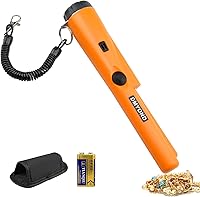
DR.ÖTEK Metal Detector Pinpointer: Best for a simple LCD

- LCD screen
- Audio and vibration alerts
- IP68 waterproof rating
- One-touch interference cancellation
The DR.ÖTEK offers an LCD, audio and vibration alerts, plus one-touch signal cancellation. It is an alternative for buyers who want a screen and a simpler stated alert setup.
Pros
- LCD target signal
- Audio and vibration alerts
- IP68-rated waterproof design
- Includes a retractable hanging wire, belt loop, manual and 9V battery
Cons
- Does not specify the same tone choices as the AccuPOINT
- Check the exact dimensions and included kit before buying
The DR.ÖTEK has an LCD target signal, audio and vibration alerts, and one-touch signal cancellation. Its stated kit includes a retractable hanging wire, belt loop, user manual and 9V battery.
The DR.ÖTEK is also rated IP68. Its listed features don't specify the AccuPOINT's 1-Tone, 2-Tone and Iron-Off choices, so the Nokta may suit you better if those modes are central to your decision.
Minelab PRO-FIND 35 Waterproof Pinpointer Metal Detector: Best for ferrous tone ID

- Ferrous Tone ID
- Five sensitivity levels
- IP54 rating
- Audio and vibration indication
The PRO-FIND 35 offers two responses to help distinguish ferrous from nonferrous targets, plus five sensitivity levels. Its IP54 rating differs from the IP68 ratings of the other options here.
Pros
- Ferrous Tone ID
- Five sensitivity levels
- Detector Interference Free technology
- Built-in flashlight, holster and lanyard included
Cons
- IP54 rating is different from the IP68 options
- No LCD screen is specified
The Minelab PRO-FIND 35 uses Ferrous Tone ID, with two different responses to help distinguish ferrous junk from nonferrous targets. It also has five sensitivity levels and Detector Interference Free technology to reduce interference with an operating detector.
Its IP54 rating differs from the IP68 rating of the AccuPOINT and DR.ÖTEK. The PRO-FIND 35 includes a built-in flashlight, holster and lanyard, while the AccuPOINT's key advantage in this group is its color LCD and visible settings.
Our Nokta Pointer Review covers another Nokta option. You can also compare these models with our guide to the best metal detector pinpointer choices.
What should you check before buying?
Choose the AccuPOINT if its screen, alert choices and tone settings match how you want to search. Compare these features with the simpler alert setup on the DR.ÖTEK and the Ferrous Tone ID and sensitivity controls on the Minelab.
Consider how you prefer to receive a signal. Audio Only, Vibration Only and Audio & Vibration give the AccuPOINT three options, while the other models describe their own audio and vibration alerts.
Check the water conditions where you expect to use the tool. The AccuPOINT and DR.ÖTEK are IP68-rated, while the PRO-FIND 35 is IP54-rated; follow each maker's instructions for use and care.
Think about whether you'll use adjustable settings regularly. If you mainly want a straightforward pointer, a screen and several modes may be more controls than you need.
If you value seeing battery and sensitivity information, the AccuPOINT's LCD may be a deciding feature.
For more context on how your main detector finds a target, read How Does a Metal Detector Coil Work? What to Know.
The coil and pinpointer play separate roles in the search and recovery process.
Is the Nokta AccuPOINT worth choosing?
The AccuPOINT is a strong choice to consider if you want visible settings, selectable alerts and iron response controls in an IP68-rated pinpointer. Its screen, tone modes, adjustable backlight and volume give you more ways to tailor the tool than a basic pointer.
Choose the DR.ÖTEK if its LCD and one-touch signal cancellation fit your needs, or the Minelab if Ferrous Tone ID and five sensitivity levels matter more. The right choice comes down to the controls you'll use and the water rating suited to your search conditions.
For another rechargeable model, read the XP MI-4 pinpointer review.
Our score weighs specs and features against what you're shopping for. For the AccuPOINT, the display, alert options, tone modes and stated waterproof rating support its score of 9.5.
Pick the AccuPOINT if you want its screen and mode choices; pick an alternative if its particular controls fit your recovery routine better.
Frequently asked questions
Is the Nokta AccuPOINT waterproof?
The AccuPOINT is rated IP68 and specified for use up to 10 ft (3 m). Check the manual for its water-use limits and care instructions, especially before submerging it.
Waterproof ratings apply to stated conditions, so inspect the device and follow Nokta's guidance before using it in water.
What does the AccuPOINT screen show?
The color LCD shows battery life, sensitivity level and other settings. That can help when you want to confirm your setup at a glance.
The pinpointer also has adjustable backlight brightness, so you can choose a brighter or dimmer screen setting for the conditions where you are detecting.
Can the Nokta AccuPOINT ignore iron?
The AccuPOINT offers 1-Tone, 2-Tone and Iron-Off settings. Iron-Off is the option to consider if you want to turn off iron response, while the other modes give you different tone choices.
Check the manual to understand how each setting behaves with your targets and ground.
How does the AccuPOINT compare with the Minelab PRO-FIND 35?
The AccuPOINT has a color LCD, three alert modes and an IP68 rating up to 10 ft (3 m). The PRO-FIND 35 offers Ferrous Tone ID and five sensitivity levels, with an IP54 rating.
Choose based on which controls matter most and the water conditions you expect.