8 Best Headphones for the Minelab Manticore (October 2026)
The best Minelab Manticore headphones include the Garrett Metal Detectors MS-2 Headphones for adjustable wired listening, the MINELAB ML85 Wireless Low Latency Headphones for everyday wireless detecting, and the Detecting Adventure Thresher Submersible Headphones for Minelab Equinox for submerged detecting with WM08.
On this page (6 sections)
- Which headphones work with the Minelab Manticore?
- The best Minelab Manticore headphones for different needs
- Should you choose wireless or wired Manticore headphones?
- Which Manticore headphones are suitable for water?
- How to choose the right Minelab Manticore headphones
- Which Minelab Manticore headphones should you pick?
The MINELAB ML85 is the best Minelab Manticore headphone choice for most land detecting because its stated compatibility includes the detector and its wireless audio is described as low latency. For underwater use, compare the Thresher and DetectorPro Amphibian, then check which connection fits your setup.
Headphone choice depends on where you detect and whether you want a cable. A wired model can avoid relying on a wireless connection, while wireless headphones leave the cable out of the way; water use calls for headphones specifically described for that purpose.
For more general fit and connection advice, see our guide to best headphones for metal detecting. This roundup compares the products using their stated features and compatibility.
Our score weighs specs and features against what you're shopping for.
Our picks at a glance
-
1
 Best for adjustable wired listening
Garrett Metal Detectors MS-2 Headphones
9.7/10 our score
See it on Amazon -
2
 Best for everyday wireless detecting
MINELAB ML85 Wireless Low Latency Headphones
9.6/10 our score
See it on Amazon -
3
 Best for submerged detecting with WM08
Detecting Adventure Thresher Submersible Headphones for Minelab Equinox
9.5/10 our score
See it on Amazon
- 4
 Check it
Nokta Makro Bluetooth Low Latency Headphones
Best for a second detector setup - 5
 Check it
MINELAB ML105 Headphones for MANTICORE
Best for wireless with a cable backup - 6
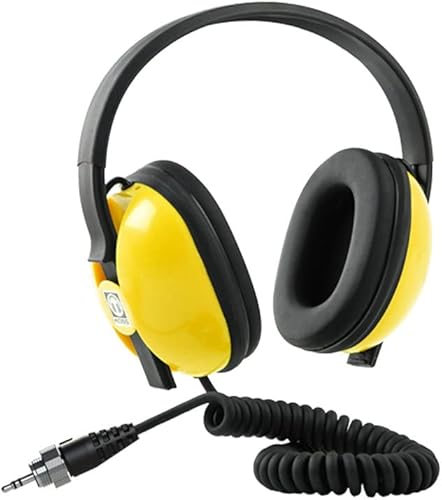 Best for waterproof wireless useCheck it
 - 7
 Check it
DetectorPro Amphibian Underwater Headphones for The Minelab Equinox
Best for direct wired underwater use - 8
 Check it
MINELAB ML 80 Bluetooth Wireless Low Latency
Best for older Equinox models
Which headphones work with the Minelab Manticore?
The ML85 and ML105 are Minelab wireless options with Manticore compatibility stated, while the Thresher and DetectorPro Amphibian are options for water use. Compatibility can vary by model and connection, so check the exact detector and accessory combination before you buy.
| Product | Best for | Connection | Cable | Volume | Our score |
|---|---|---|---|---|---|
| Garrett Metal Detectors MS-2 Headphones | adjustable wired listening | Wired, 1/4 in stereo plug | 10 ft reinforced coiled cable | On-cable volume control | 9.7 |
| MINELAB ML85 Wireless Low Latency Headphones | everyday wireless detecting | Wireless; detachable 3.5 mm auxiliary cable | 9.6 | ||
| Detecting Adventure Thresher Submersible Headphones for Minelab Equinox | submerged detecting with WM08 | Minelab approved connectors | 9.5 | ||
| Nokta Makro Bluetooth Low Latency Headphones | a second detector setup | Bluetooth 4.0 | 9.4 | ||
| MINELAB ML105 Headphones for MANTICORE | wireless with a cable backup | Bluetooth or wired through included AUX cable | 8.8 | ||
| MINELAB | waterproof wireless use | Wireless | 8.7 | ||
| DetectorPro Amphibian Underwater Headphones for The Minelab Equinox | direct wired underwater use | Wired, plugs directly into the detector | 8.1 | ||
| MINELAB ML 80 Bluetooth Wireless Low Latency | older Equinox models | Wireless or wired with included aux cable | 7.9 |
The best Minelab Manticore headphones for different needs
The right pick depends on your detecting conditions: the ML85 suits everyday wireless use, and the submersible models suit water. These are the 8 options in descending score order.
Garrett Metal Detectors MS-2 Headphones: Best for adjustable wired listening
- Wired connection
- 1/4 in right-angle stereo plug
- Volume control
- 10 ft reinforced coiled cable
The volume control and long coiled cable are useful features for wired detecting. Its 1/4 in plug means you should confirm the Manticore connection and any adapter needs before choosing it.
Pros
- Volume control
- Long reinforced coiled cable
- Comfortable headband and ear pads
Cons
- Wired connection
- Manticore compatibility is not specified
The Garrett MS-2 has a 1/4 in right-angle stereo plug, a 10 ft reinforced coiled cable and a volume control. Those features give you cable reach and a way to adjust listening level at the headphones.
Its stated compatible devices are Garrett detectors, and Manticore compatibility is not specified. Before using it with a Manticore, confirm the detector's headphone connection and whether an adapter is appropriate for this model.
Choose it if you want wired headphones with an on-cable volume control and have verified the connection. It is not a direct recommendation for Manticore use without that compatibility check.
MINELAB ML85 Wireless Low Latency Headphones: Best for everyday wireless detecting
- Manticore compatibility
- Low-latency wireless audio
- 35–40 hour operating time
- Detachable 3.5 mm auxiliary cable
This Minelab model is specified for the Manticore and offers low-latency wireless audio. It also includes a detachable auxiliary cable for wired use.
Pros
- Manticore compatibility is stated
- Low-latency wireless audio
- Auxiliary cable and carrying case included
Cons
- No submersion rating is stated
The ML85 is the clearest everyday wireless fit in this group because its stated compatible detectors include the Manticore. Minelab describes its wireless audio as low latency, which is useful when you want detector responses without a cable.
It has a stated operating time of 35–40 hours and an operating range of up to 10 m. The detachable 3.5 mm auxiliary cable provides a wired option, and a hard shell case and mesh bag are included.
Choose the ML85 for land detecting when wireless use is your priority. The available details do not give it a submersion rating, so choose a headphone specifically described for underwater use if you plan to submerge it.
For the related wireless options, read which wireless headphones work with the Minelab Manticore.
Detecting Adventure Thresher Submersible Headphones for Minelab Equinox: Best for submerged detecting with WM08
- Submersible design
- Compatible with Manticore
- Compatible with WM08 wireless module
- Made for land, snorkeling and diving
The Thresher is described for submerged use and is specified as compatible with the Manticore and WM08. Its water-focused design makes it a distinct choice from ordinary wireless headphones.
Pros
- Manticore and WM08 compatibility stated
- Made for land, snorkeling and diving
- Description states a 100+ ft depth rating
Cons
- Confirm connector and use setup for your detector
The Thresher is a submersible option specified for the Manticore and WM08. Its description states a depth rating of 100+ ft and says it is made for land, snorkeling and diving.
That makes it a different kind of pick from wireless headphones intended for ordinary land use. The maker describes its connectors as Minelab approved, but you should still confirm the precise connection method for your detector and accessory arrangement.
Choose the Thresher when submerged use matters and you want WM08 compatibility. Check the maker's instructions for fitting and water use before heading out.
Nokta Makro Bluetooth Low Latency Headphones: Best for a second detector setup
- Bluetooth
- Low latency
- Designed for Nokta The Legend
These headphones are described for the Nokta The Legend, not the Manticore. They make sense if you also use a Legend, but don't assume that their wireless connection will pair with a Manticore.
Pros
- Low-latency Bluetooth is specified
- Designed for The Legend
Cons
- Manticore compatibility is not stated
These Nokta headphones are designed for The Legend, and their features include Bluetooth and aptX Low Latency. Their stated compatibility does not include the Manticore.
They may suit a detectorist who uses both brands and wants a dedicated pair for the Legend. Don't assume a low-latency Bluetooth feature means the headphones will connect to a Manticore.
If you also use the Legend, our guide to best Nokta Legend headphones covers that detector-specific choice. For a Manticore-only setup, choose a model whose compatibility is stated.
MINELAB ML105 Headphones for MANTICORE: Best for wireless with a cable backup
- Manticore compatibility
- Wireless Bluetooth
- Low-latency technology
- 3.5 mm auxiliary cable included
The ML105 is specified for the Manticore and can connect wirelessly or through its included AUX cable. That gives you two connection options, subject to the detector's socket and setup.
Pros
- Manticore compatibility is stated
- Wireless and wired options
- USB-C charging cable included
Cons
- No submersion rating is stated
The ML105 supports wireless and wired use and lists the Manticore among its compatible detectors. Its included 3.5 mm AUX cord lets you connect it to a detector headphone socket, while Bluetooth gives you a wireless option.
The package also includes a USB-C charging cable and instruction manual. The product details describe low-latency technology, but they do not give this model a submersion rating.
Choose the ML105 if you want one headphone set with both connection types and Manticore compatibility. Before relying on the wired option, confirm that the cable and detector socket match your intended setup.
MINELAB: Best for waterproof wireless use
- Waterproof feature stated
- Wireless connection
- Manticore compatibility
This Minelab headphone option is marked waterproof and lists the Manticore among its compatible detectors. Check the exact water-use instructions and connection setup before taking it into water.
Pros
- Waterproof feature stated
- Manticore compatibility stated
Cons
- A depth rating is not specified
This Minelab model is a wireless option marked waterproof, and its compatible devices include the Manticore. That combination makes it relevant for buyers who want a wireless headphone option and need water protection.
A waterproof label alone does not tell you the depth or duration the headphones can handle. Check the exact use limits and care instructions before submerging them, especially if your detecting plans involve diving.
Choose these for water use only after confirming the manufacturer's limits match your conditions. For a stated depth rating and WM08 compatibility, compare the Thresher.
DetectorPro Amphibian Underwater Headphones for The Minelab Equinox: Best for direct wired underwater use
- Designed for underwater use
- Manticore compatibility
- Direct connection to detector
- Not for use with WM08
The Amphibian is described as an underwater option that plugs directly into the detector. It is compatible with the Manticore, but the maker specifically says it is not for use with WM08.
Pros
- Manticore compatibility stated
- Direct detector connection
- Designed for underwater use
Cons
- Not compatible with WM08 use
The DetectorPro Amphibian is a wired underwater headphone that plugs directly into the detector. Its stated compatibility includes the Manticore and Equinox series, and it is explicitly not for use with WM08.
That direct connection makes it important to follow the intended setup rather than treating it as a wireless accessory. Check the detector connection and the manufacturer's water-use instructions before taking it underwater.
Choose it if you want an underwater model that connects directly to the Manticore. If your setup depends on WM08, choose another option, such as the compatible Thresher.
MINELAB ML 80 Bluetooth Wireless Low Latency: Best for older Equinox models
- Bluetooth with aptX Low Latency
- Wired option using included aux cable
- Designed for Equinox 600/800
The ML 80 offers wireless and wired listening, but its stated compatibility is limited to the Equinox 600 and 800. Don't choose it for a Manticore unless compatibility is confirmed for your setup.
Pros
- Wireless and wired options
- aptX Low Latency stated
Cons
- Manticore compatibility is not stated
The ML 80 offers Bluetooth with aptX Low Latency and a wired option through its included aux cable. Its stated compatible detectors are the Equinox 600 and Equinox 800, not the Manticore.
That makes it a weaker fit for this roundup despite the connection choices. Use it only if you have one of the specified Equinox detectors, or if you independently confirm compatibility with your Manticore before buying.
For other Minelab models, see our guide to which headphones work with Minelab metal detectors.
Should you choose wireless or wired Manticore headphones?
Wireless headphones are a practical choice if you want to move without a cable, and the ML85 and ML105 both state Manticore compatibility. Wired headphones can suit buyers who prefer a direct cable connection, but the plug and detector socket must match.
The ML105 includes a 3.5 mm AUX cable, and the ML85 includes a detachable 3.5 mm auxiliary cable. The Garrett MS-2 has a 1/4 in plug and does not state Manticore compatibility, so confirm the connection before choosing it.
If you are considering a reset while troubleshooting audio, first check your settings and connection. Our guide explains how to factory reset the Minelab Manticore.
Which Manticore headphones are suitable for water?
The Thresher and DetectorPro Amphibian are the clearest choices here for submerged use because their descriptions identify them as submersible or underwater headphones. The Minelab model marked waterproof may also fit some water use, but its depth limit is not specified here.
The Thresher is described with a 100+ ft depth rating and WM08 compatibility. DetectorPro Amphibian plugs directly into the detector and is not for use with WM08, so match the headphone to your intended connection as well as the water conditions.
For any water use, read the manufacturer's instructions for depth, duration, and care. A waterproof label does not by itself tell you whether a headphone suits snorkeling or diving.
How to choose the right Minelab Manticore headphones
Start with your detector and accessory setup, then decide whether you need wireless listening or a cable. That order helps avoid buying a headphone whose connection or compatibility does not fit your equipment.
- For everyday wireless use: The ML85 states Manticore compatibility and low-latency wireless audio.
- For wireless and wired flexibility: The ML105 includes an AUX cable and states Manticore compatibility.
- For submerged use with WM08: The Thresher is specified as compatible with both.
- For direct wired underwater use: The DetectorPro Amphibian is specified for Manticore use, but not with WM08.
- For a waterproof Minelab option: Confirm the use limits, since a depth rating is not specified.
- For other wired headphones: Check the plug, socket and compatibility before buying.
If you also use an X-Terra Pro, compare its options in our guide to Minelab X-Terra Pro wireless headphones.
Which Minelab Manticore headphones should you pick?
Choose the ML85 for everyday wireless detecting, the ML105 if you want wireless and wired connection options, and the Thresher if you need a stated depth rating and WM08 compatibility. For direct wired underwater use, consider the DetectorPro Amphibian and remember it is not for WM08.
Check compatibility and connection details against your own detector setup before ordering. That small check matters most when choosing a wired pair or planning to use headphones underwater.
Our top 3 picks at a glance
-
1
Best for adjustable wired listening
Garrett Metal Detectors MS-2 Headphones
9.7/10 our score
See it on Amazon -
2
Best for everyday wireless detecting
MINELAB ML85 Wireless Low Latency Headphones
9.6/10 our score
See it on Amazon -
3
Best for submerged detecting with WM08
Detecting Adventure Thresher Submersible Headphones for Minelab Equinox
9.5/10 our score
See it on Amazon


