How to Update the Minelab Equinox 900
To update the Minelab Equinox 900, connect it by cable to a computer running the current Minelab update software, follow the on-screen steps, and leave it powered until it finishes. Check your version first and do not disconnect it during the install.
On this page (9 sections)
- What software do you need for the Minelab Equinox 900 update?
- How do you check the current version before you update?
- How do you prepare your computer and detector for the update?
- How do you install the Minelab Equinox 900 update step by step?
- What should you do if the update does not start or stops?
- How do you test the detector after the update?
- What gear helps you hunt well with an updated detector?
- How do you care for the detector after an update?
- When should you update again, and when should you wait?
To update the Minelab Equinox 900, use the current Minelab update software on a computer, connect the detector with a cable, and follow each prompt until the install completes. That is the core of any minelab equinox 900 software update, and the steps below walk through each part in order.
Do not rush the process. The update changes the software inside the detector, and an interrupted install can leave it hard to use.
What software do you need for the Minelab Equinox 900 update?
You need the current Minelab update program for the Equinox series, downloaded from Minelab's official support pages. Check the version for the Equinox 900, not the Equinox 600 or 800.
Download the software early and save it where you can find it again. Note the file name and version number in a simple note on your phone or computer.
Open the release notes before you install. They often explain which faults were fixed, which features changed, and whether older settings carry over.
Compare the process with other Minelab models if you own more than one detector. Our guide to how to update a Minelab Manticore shows a different model process, and the minelab equinox 800 update guide covers an older Equinox.
Those pages help you keep each model's files separate.
Avoid third-party download sites. A fake or altered installer could harm your detector or your computer.
How do you check the current version before you update?
Check the version first so you know what you have and can confirm the new version after. Turn the detector on, open the settings menu, and look for the version or about section.
That note matters if the update seems to fail or if you need support help later. Minelab support will ask for your current and target versions.
Check the battery level at the same time. A low battery during an update is a risk you can avoid in seconds.
Charge the detector fully before you connect the cable.
Also note your main settings before you start. Save your preferred mode, sensitivity, and custom settings on paper or in a phone note.
How do you prepare your computer and detector for the update?
Prepare a stable setup before you open the installer. Use a laptop or desktop with a free USB port, a good-quality cable, and a flat surface where nothing will pull the cable.
Close other programs that might slow the computer or prompt a restart. Turn off sleep settings for the session so the computer does not pause mid-install.
Clean the USB port on the detector and the computer port with a dry cloth. Dirt or a loose fit can cause the software to lose the connection.
Keep pets, kids, and bags away from the table. A knocked cable is a common cause of a failed update.
Work indoors at a table rather than outdoors. Good light helps you read prompts, and a dry surface protects the ports.
How do you install the Minelab Equinox 900 update step by step?
Install the update by opening the installer, connecting the detector when prompted, selecting the Equinox 900, and waiting for the progress bar to finish.
Start with the detector switched on and connected. Open the update software and let it search for the device.
If it does not find the detector, check the cable, try another USB port, and confirm the detector is on.
Select the correct model when the software asks. Choose the Equinox 900 entry, then confirm the version you want to install.
Press update and leave it alone. Do not press buttons on the detector, unplug the cable, or close the software.
The screen may restart on its own during the process.
Disconnect the cable only after that message appears. Power the detector off and on again to confirm it starts normally.
Check the version number once more.
What should you do if the update does not start or stops?
If the update does not start, check the cable, power, and model selection before you try again.
First, confirm the detector is on and charged. Then reseat both ends of the cable.
Try a different USB port on the same computer, as some ports give less steady power.
Next, confirm you downloaded the Equinox 900 file. A file for another model will not install correctly.
Our minelab equinox 600 update page can help if you have that model too.
If the progress bar stops, leave it for a few minutes. Some steps pause while the detector writes new files.
Do not switch the detector off during a pause. If it stays stopped, close the software, reconnect the cable, and start again.
Keep the installer and your version notes until the detector works well.
How do you test the detector after the update?
Test the detector right after the update, before you pack for a hunt. Power it on, check the version, run each mode, and listen for clear tones over a known target.
Place a coin, a piece of jewelry, and a small piece of scrap metal on the ground one at a time. Sweep the coil at a normal height and note the sound and the number on the screen.
Compare your minelab equinox 900 target id chart reading with your results.
Walk a few steps between sweeps to check for chatter or dropouts. Try your saved settings first, then test the defaults.
Check the headphones or speaker output you normally use. Clear audio matters as much as the screen number, because you often dig by sound.
Note any change you notice so you can adjust your settings before your next trip.
What gear helps you hunt well with an updated detector?
Good gear helps you get the most from new software, since you will likely hunt longer and listen more closely. Comfort, clear audio, and hand protection are the three areas where small upgrades make a real difference.
Many hunters use headphones for long beach or park sessions. The Bounty Hunter HEAD-PL set has padded earcups, a 1/4-inch stereo plug, and wired connection for Bounty Hunter detectors, which is useful if a second detector joins your kit.
For a backup or park detector, the Bounty Hunter TK4 Tracker IV is an analog, battery-powered model with an 8-inch waterproof coil and three detection modes. It suits adults and kids learning the basics, and its simple controls make it easy to hand to a friend on a group hunt.
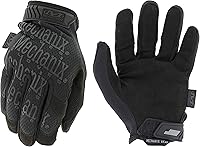
Hand protection matters when you dig in rocky soil or brush. The Mechanix Wear Original Tactical Covert Gloves in medium have synthetic leather palms, touchscreen capability, and a hook-and-loop cuff.
How do headphones change your post-update testing?
Headphones change testing because you hear faint signals that the speaker might mask in wind or traffic noise.
Plug the headphones in, set a comfortable volume, and repeat your coin test. Listen for a clean, steady tone as the coil passes over the target.
Padded earcups help on long tests, since you may run the same sweep many times. Wired models avoid pairing delays, and a secure plug keeps the sound steady while you move.
How do gloves help with digging and controls?
Gloves help because digging, clearing roots, and handling wet finds wear hands fast.
Synthetic leather palms grip tools well without the bulk of heavy work gloves. Touchscreen capability helps when you check a map or photo without removing them.
Choose a size that lets you flex your fingers fully. Too tight a glove will make small controls hard to use, and too loose a glove can catch on brush.
How do you care for the detector after an update?
Care for the detector after the update by keeping ports dry, wiping the coil, and storing it away from heat and damp.
Wipe the control unit and coil with a damp cloth after a hunt, then dry them with a soft towel. Check the charging port for sand or moisture before you plug in a cable.
Store the detector in a cool, dry place with the coil not pressed against sharp objects. A carrying case or padded bag helps on the drive home.
Charge the battery before long storage periods, following Minelab's guidance for your model. A stored detector that sits empty for months may need a charge before it will power on.
If you hunt in water or wet sand, rinse the coil as Minelab allows for the Equinox 900, then dry it well.
When should you update again, and when should you wait?
Update again when Minelab releases a fix for a fault you have or a feature you plan to use. You do not need to install every release the day it appears.
Read the release notes and check whether the change affects your modes or coils. If a release improves beach performance and you hunt there often, it may be worth doing now.
Keep a simple log with the date, version, and a one-line note on how the detector felt after. Our xp metal detectors update guide is a useful reference if you also own XP gear.
For Garrett detectors, our garrett ace apex software update page covers a different brand process. Keeping each brand's steps separate avoids mixing files.
A final check before you update is simple: confirm the right installer, charge the battery, save your settings, and give the install time to finish.
Frequently asked questions
How often should I update the Minelab Equinox 900?
Update when Minelab releases a new version that addresses a fault or adds a feature you want. You do not need every release on the same day.
Check the release notes, note your current version, and keep a copy of the installer so you can repeat the process if needed.
Can I update the Equinox 900 with a phone?
Use a computer for the Equinox 900 update, as the Minelab software is designed for that process. A phone or tablet will not run the same desktop installer.
Keep the detector connected with the supplied cable, leave it on a steady power source, and do not close the software during the steps.
What should I do if the update stops halfway?
Leave the detector connected, keep the software open, and check the cable and power first. Restarting the process can help, but do not switch the detector off while the progress bar is moving.
If it fails again, close the software, reconnect the cable, and try the installer once more from the start.
Will an update change my Equinox 900 settings?
An update can change how modes behave, so check your settings after it finishes. Save the settings you rely on before you start, then compare the detector after the restart.
Run a short test in your yard and check the target ID chart before you head out for a long hunt.